
//

//
A lot has been said about different approaches to building websites. With the rise of responsive design as an industry standard, our approach to designing websites and interfaces has changed as well. In the past, the process was streamlined in stages (such as planning, wireframing, designing, slicing, developing, testing and publishing). Nowadays, with device landscape changed as well (mobile phones, tablets, laptops, desktops, and even watches) it’s a lot harder to keep everything consistent and functional across all devices.

We don’t have the resources to create a static design of one component (let’s say a header or a footer) across 10 different resolutions and viewports. Even if we design for the most popular devices, we’ll have to think about 4–5 screens with different aspect ratios, screen density, or screen estate in general. This is easier said than done.
Before we continue, I’d like to explain my design and planning process to better communicate my point of view. I start with a questionnaire for the client with different questions concerning the target audience of the project, strategies, expectations, and more. The better I understand the project and the client before I start, the more efficient I’ll be later on.
Next step is writing about the project to see if I understood the concept. This is helpful when working on projects in a niche where you don’t have much experience. Sort of like a functional specification, but less technical. It comes handy to define terminologies, keywords, and processes. Depending on the project complexity, I’ll probably do several scenarios and user flows. Usually the user onboarding flow, creation of content (if it’s that type of site), a checkout if it’s a webshop, or whatever is the specific kind of project I’m working on.
Next, I’ll start to produce a mood board, collection of things I like on other sites, colors or fonts we might use, icons, images and so on. If the client has a branding guideline, now would be a good time to explore it and talk about style.
You should do an interface inventory at this point. Brad Frost has a good article on that and a quote from his article really sums it up nicely:
An interface inventory is a comprehensive collection of the bits and pieces that make up your interface.
If you are doing a project from scratch, then you can start by writing all components and elements that your project will be built from. An unordered list will do just fine (definitely better than nothing).
Prototyping is the next big phase of every project, and I often start with pencil and paper. Building quick wireframes to talk about the layout and functionality is a good start. It doesn’t cost much time to build dozens of wireframes of different templates and components, but depending on the complexity of the prototype I might use apps like Balsamiq, Moqups, or even do a clickable HTML prototype.
If the prototype is a success, I’ll do some components or templates in a design program like Photoshop or Sketch. I pick one of the more complex pages that include different interface elements (e.g. navigation, header, footer, product listing). I’ll play with different styles, icons, and colors based on the predefined mood board. The purpose of visual design is to explore what a finished design might look like, keeping in mind that I’ll probably change it (for the better) when it’s built with HTML/CSS. Prototypes vary on the project, and I don’t always follow the same approach and might combine multiple techniques or programs into one project.
Designing in the browser is a term that became popular with the rise of responsive web design. In order to minimize hours spent in design programs like Photoshop, designers were urged to move the design phase into the browser by utilizing CSS. I’m quite fond of this approach, because it proved more efficient in my experience. In my case, the deliverable is HTML and CSS design, viewable and usable in the browser. To learn why, keep reading.
By focusing on the HTML mockup and testing design ideas in–browser with CSS, we save time we might usually spend in Photoshop or Sketch doing static mockups. For best results, I recommend you equip yourself with a good code editor and browser refresh method so you can see changes in real time as you type them. I rely on Sublime Text and Codekit combo, although there are other options available as well depending on your preference or operating system.

HTML and CSS, structured as they are, forces us to think about patterns and keep us in check. It’s easier to think about modularity when you are building HTML components that can easily be copied, duplicated and filled with dynamic data while keeping the same structure. If you want to create a specific modification, you have to explicitly target that element or add another CSS class. When you style headings, they will be consistent across the site unless they are overridden. Same goes for other elements. This type of thinking forces you to standardize, group common elements together, reuse already styled elements as much possible, and most importantly keep everything modular.
With a single CSS declaration, you can change padding on buttons for better touch targets and test directly on a mobile phone, tablet, and desktop. This can’t be easily done in Photoshop or Sketch, because other elements are not aware of each other in layout and you would have to reorganize objects each time you change something in size. Want to try out a different header color scheme? Several lines of code and changes are visible on all HTML templates on all your devices and screens. That kind of flexibility for exploration can’t be emulated easily when you have 20 static mockups. Granted, you could use smart objects in Photoshop, or Symbols in Sketch for components but it’s not as versatile as CSS.
The Internet would have been very different if web browsers were just PSD viewers.
In this phase you will have to make several technical decisions. The weight of these decisions will influence the quality of the design. Some of the questions you will need to answer:
Choosing fonts for your project can be challenging. There are many possibilities and as much constraints that you become aware when you need to choose font delivery approach. Since the design will be used in the browser there is no better place to try out fonts. Font readability can vary based on the size, weight, colors, rendering — so by trying out fonts directly in the browser you are making sure that desired expectations are met.
There are many tools online that you can use for testing fonts and trying out combinations. My personal favorites are Typetester and Typecast, where you can test different fonts from various services and foundries. If I’m working with a specific font subscription service like Typekit or Fonts.com, I generate fonts and test on my own templates directly. Generating a Typekit package with new fonts is really simple and fast, and you get to see how the font will affect performance of your page as well.
If you decide to draw icons by yourself you will need to define size, grid, and style. I do all my icons in Illustrator where every artboard represents one icon. You can easily export icons from Illustrator as SVG or PNG, which can later be turned into an icon font with services like Icomoon. I would suggest to go with vector icons (SVG) if possible, because vectors are resolution independent so you won’t have to worry how they display on high definition screens — they will be sharp.
There are a lot of premium icon packs with a variety of icon styles, so if you need diversity that is also a viable option. Unless you did an icon inventory from the start and know exactly what icons you’ll use in the project, leave room for the option to easily add new icons.
Even if we design in the browser, with dozens of templates and components we might lose track of where something is used and in what fashion. That’s why I suggest to build a style guide of all components as a central repository. Specific page templates will be built from this style guide by combining components and modules into whole pages. Components might be form elements, pagination, product listing, image gallery, modal windows, etc. and are used as building blocks for required templates. Keeping everything in one place is really handy when you want to test a specific component.

I would suggest to separate styling of these components into separate files. For example, pagination styling will be in in _pagination.scss, form elements in _form.scss, and all these files will be included into a single SCSS file with other files (variables, mixing, etc.). Although your style.scss might be composed of dozens of “small files”, I hope you’ll agree with me that it’s easier to keep track of changes (whether you are using source control or not) when several people are working on the same project if everything is separated into smaller chunks. It’s important that you maintain your style guide even after project is in production, since you need to be able to keep track of every component on the site - no exceptions.
From the development standpoint, there are many approaches to writing modular CSS. Most known are SMACSS, BEM, and OOCSS — I encourage you to read about these techniques because there is a lot to learn, even if you end up developing your own approach. By now you should have a nice collection of components and pages which will enable you to easily build new pages or scenarios. Just copy and paste (or include, if you are using a build system) elements from the style guide and rearrange them as needed. Since everything is modular, you don’t have to worry about design and code consistency; but don’t forget that if you change something semantically, you’ll need to update the style guide with changes (or a new component). To keep everything organized, I suggest you use some sort of templating approach to building pages such as a Gulp/Grunt build system or even good old PHP might do the trick.
Now you have a central repository of components, pages build from those components, and every piece documented — from colors, icons, and fonts to components that are used on your project. Here comes the fun part. From this point on, you probably won’t open your design tool, and most of the “design” will be done directly in the code. You are not sure how a specific change will impact different use–cases? Preview your design simultaneously on different devices and browsers to see how that heading or button change will impact the design. Not sure about how font additional weights will impact performance if you are including custom fonts? You can test your work–in–progress project performance using services like WebPageTest, and make informed decisions on actual results. You can’t do that in Photoshop or Sketch. That’s why I would choose HTML and CSS over these apps every time when it comes to refinement and adjustments of the original design mockup.
If you really care about design, you should make sure that every part of it is perfect. Something can look amazing in a static design mockup, but it might look terrible when implemented. Let’s test and fix these use–cases in the environment where everyone will see and use them - in the browser.
member since September 1, 2014
Windows 10 is a well-meaning effort by Microsoft to mollify Windows 8 haters and coax Windows 7 loyalists to upgrade — all while stubbornly sticking to its goal of a single OS for every possible platform. And by framing the problem that way, Microsoft has given itself a nearly impossible task.
To the company’s credit, each new build lurches closer to being usable, although with new bugs every time, it is difficult to evaluate how smooth the final release version will be. Best case: It may earn the grudging acceptance of Windows 7 users who refuse to move to Windows 8. And part of that acceptance will come not from sudden enthusiasm for a new way of interacting with the desktop, but from a desire to take advantage of the clear core benefits Windows 10 provides in performance, security, administration, and memory usage over Windows 7 and even Windows 8.
So why is it so hard to convince users to move to a brand-new, free, feature-packed, more efficient OS? Apple does it all the time. Simply put, because Microsoft didn’t build Windows 8 or Windows 10 for Windows users. It built them to further its own business strategy of using the power of the once-ubiquitous Windows platform to extend its dominance into the rapidly growing mobile space. The result is an OS whose features are now flipping and flopping with each new build — as Microsoft tries to fix problems of its own creation.
What if instead, after realizing what a terrible mistake Windows 8 was, Microsoft had made the truly brave decision to come clean and change its strategy? If Windows 10 had been designed from the beginning to be the best possible desktop OS, and the thousands of developer years spent trying to make it everything to everyone were instead spent providing services and applications for the mobile OS platforms people actually want? If in tandem Microsoft was willing to let go of its sub-3% market share in mobile, it could also have spent the cash it used to buy Nokia to build out its cross-platform services offerings instead. We could have had a really excellent desktop OS — worth paying for — and great integration with the leading mobile platforms.
Certainly Microsoft has woken up to providing competitive versions of its applications on Android and iOS. But imagine how much further along it would have been if it had put real work into the effort starting years ago. Perhaps we wouldn’t have to use third-party utilities to sync our information between Google and Outlook, for example. Or OneNote might have supported syncing on Android during the first several years it was available, instead of only recently. Pick any Microsoft desktop technology you access from your iOS or Android device and you can come up with a list of features that would make it much more useful.

Anyone who thinks Microsoft didn’t focus on desktop users as it evolved Windows 8 and 10 because its desktop OS has “no need for improvement” hasn’t spent enough time wrestling with the inscrutable hex error codes from Windows Update, or debugging driver version mismatches, or finding information they’re sure is somewhere on their disk. While Windows 10 isn’t final, judging by the builds so far, all of those problems are still there. Even support for high-resolution displays is still spotty. Windows 10 adds some new Zoom options, but there is still no serious scalable-font solution that works across the full range of possible displays.
As a good example of how this alternate direction would have worked, let’s look at the Control Panel. No one doubts that it is an old, crufty system for managing a computer. A desktop-focused OS project would have overhauled it completely while preserving its functionality. Instead, Microsoft seems determined to replace it in bits and pieces with new “touch-friendly” settings that aren’t much more intuitive, and that become even more frustrating when you need to go back to the old system for pieces that are still missing. Windows 10 is supposed to address this problem, but we’re less than two months from shipment and Settings are still far from being either intuitive or finished.
Tablet mode and Continuum are also inventions seeking to solve a problem Microsoft has invented for itself. For the few of us who actually own and use a Surface Tablet mode, it’s sort of a good thing. (I love that I can both taken written notes and run Outlook on my SP3, but with the addition of desktop apps to Android, I’m not sure how many others will see the need to spend that kind of money for basic productivity.) It’s good because it is better than Windows 8, where often the touch keyboard wouldn’t pop up when needed, and icons could be hard to finger.
It’s still only sort of good, though, because it’s confusing and forces the user to have one more thing to think about. Somehow iPads and Android tablets seem to easily survive the addition of a keyboard without the need for an entire special OS mode. Like many of the other new features in Windows 10, it seems like a “throw it against the wall and hope it sticks” attempt to solve a user pain point — not a from-the-ground-up technology architected to support the broad range of devices that can now run Windows.

There is a lot to like about Windows 10 — in addition to having the best kernel Windows has ever had. Edge (aka Spartan) is promising (although it too is only a prototype version, and certainly could have been shipped separately). Cortana might be useful, but is so limited and buggy in the current builds that it is hard to tell. If it doesn’t get sorted out by July, Microsoft risks taking yet another step backwards in desktop search functionality, which would be a shame. Virtual desktops are a nice feature, although hardly groundbreaking.
The included apps are certainly way ahead of the ones Microsoft shipped with Windows 8, but Microsoft has had many excellent desktop apps over the years — including the now-dead Windows Media Center, LiveWriter, and MovieMaker. It is the company’s own fault that it feels the need to start over time and again. On the tablet side, if Microsoft is serious about usability, it should be providing a better touch keyboard — one that includes swipe-through typing, for example. I also wish the company had finally fixed Windows Update. Mobile users won’t put up with the way it works now — they are spoiled by seamless OTAs from Apple and even many Android vendors.
Perhaps the ultimate warning sign about Windows 10 for me is that for many, its positioning is summed up as being “no worse than the six-year-old Windows 7, while adding support for tablets and phones.” That sounds pretty silly, but maybe not far from the truth. I run a Windows 7 desktop for some of my business-critical applications right next to a couple of Windows 8.1 machines and a couple of Windows 10 machines. I don’t really feel any less productive when I’m on the Windows 7 machine, and I can’t imagine that I’ll upgrade it to Windows 10 and risk something breaking.
Tablets are certainly a different story. I’ve already put Windows 10 on almost all my Windows tablets, and suspect most of the small number of Windows tablet users will also. Unfortunately for Microsoft, Windows tablets are a relatively small market, and may never become mainstream.
Laptops are the most interesting case. While each version of Windows adds new power management features, that may not be enough to get laptop users to upgrade. For example, Microsoft keeps changing the WiFi settings interface, and for many of us, the new version is lame compared to the more powerful one that preceded it. Engineering laptops still ship primarily with Windows 7, and I don’t see anything about Windows 10 changing that. Mainstream laptops will get dragged along onto Windows 10 because of the Microsoft marketing machine, but I don’t know how many current laptop users will bother to take advantage of the free upgrade. No doubt that is part of why Microsoft is inflicting its Windows 10 adware on the already confusing Windows Update process.
At this point the die is cast, and we’ll need to live with whatever we get on July 29th — or stay put and hope the little Get-Windows-10 nagware goes away.

deltalight - Google zoeken

#light #adelineloves #adelineinspiration

برای دیدن نمونه تصویر، بر روی عکس کلیک کنید
دانلود موزیک ویدیوی آهنگ پوچ (کیفیت 1080)
(99.62 مگابایت)

دانلود نسخه ی صوتی آهنگ پوچ (کیفیت 320)
(8.47 مگابایت)
This is a guest post by Chris Richardson. Chris is the founder of the original CloudFoundry.com, an early Java PaaS (Platform-as-a-Service) for Amazon EC2. He now consults with organizations to improve how they develop and deploy applications. He also blogs regularly about microservices at http://microservices.io.
==============
Microservices are currently getting a lot of attention: articles, blogs, discussions on social media, and conference presentations. They are rapidly heading towards the peak of inflated expectations on the Gartner Hype cycle. At the same time, there are skeptics in the software community who dismiss microservices as nothing new. Naysayers claim that the idea is just a rebranding of SOA. However, despite both the hype and the skepticism, the Microservice architecture pattern has significant benefits – especially when it comes to enabling the agile development and delivery of complex enterprise applications.
This blog post is the first in a 7-part series about designing, building, and deploying microservices. You will learn about the approach and how it compares to the more traditional Monolithic architecture pattern. This series will describe the various elements of the Microservice architecture. You will learn about the benefits and drawbacks of the Microservice architecture pattern, whether it makes sense for your project, and how to apply it.
Let’s first look at why you should consider using microservices.
Let’s imagine that you were starting to build a brand new taxi-hailing application intended to compete with Uber and Hailo. After some preliminary meetings and requirements gathering, you would create a new project either manually or by using a generator that comes with Rails, Spring Boot, Play, or Maven. This new application would have a modular hexagonal architecture, like in the following diagram:
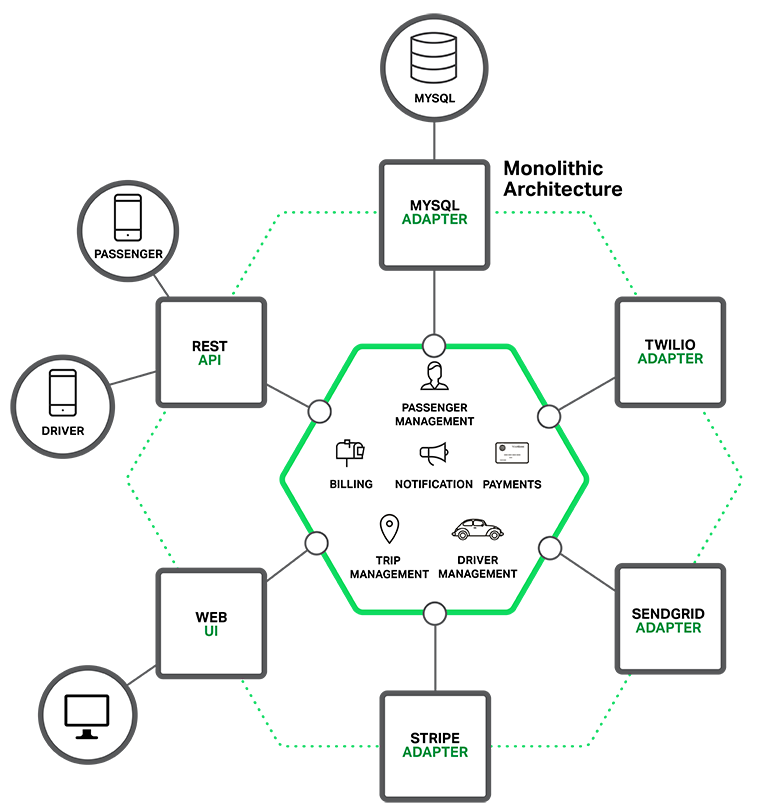
At the core of the application is the business logic, which is implemented by modules that define services, domain objects, and events. Surrounding the core are adapters that interface with the external world. Examples of adapters include database access components, messaging components that produce and consume messages, and web components that either expose APIs or implement a UI.
Despite having a logically modular architecture, the application is packaged and deployed as a monolith. The actual format depends on the application’s language and framework. For example, many Java applications are packaged as WAR files and deployed on application servers such as Tomcat or Jetty. Other Java applications are packaged as self-contained executable JARs. Similarly, Rails and Node.js applications are packaged as a directory hierarchy.
Applications written in this style are extremely common. They are simple to develop since our IDEs and other tools are focused on building a single application. These kinds of applications are also simple to test. You can implement end-to-end testing by simply launching the application and testing the UI with Selenium. Monolithic applications are also simple to deploy. You just have to copy the packaged application to a server. You can also scale the application by running multiple copies behind a load balancer. In the early stages of the project it works well.
Unfortunately, this simple approach has a huge limitation. Successful applications have a habit of growing over time and eventually becoming huge. During each sprint, your development team implements a few more stories, which, of course, means adding many lines of code. After a few years, your small, simple application will have grown into a monstrous monolith. To give an extreme example, I recently spoke to a developer who was writing a tool to analyze the dependencies between the thousands of JARs in their multi-million line of code (LOC) application. I’m sure it took the concerted effort of a large number of developers over many years to create such a beast.
Once your application has become a large, complex monolith, your development organization is probably in a world of pain. Any attempts at agile development and delivery will flounder. One major problem is that the application is overwhelmingly complex. It’s simply too large for any single developer to fully understand. As a result, fixing bugs and implementing new features correctly becomes difficult and time consuming. What’s more, this tends to be a downwards spiral. If the codebase is difficult to understand, then changes won’t be made correctly. You will end up with a monstrous, incomprehensible big ball of mud.
The sheer size of the application will also slow down development. The larger the application, the longer the start-up time is. For example, in a recent survey some developers reported start-up times as long as 12 minutes. I’ve also heard anecdotes of applications taking as long as 40 minutes to start up. If developers regularly have to restart the application server, then a large part of their day will be spent waiting around and their productivity will suffer.
Another problem with a large, complex monolithic application is that it is an obstacle to continuous deployment. Today, the state of the art for SaaS applications is to push changes into production many times a day. This is extremely difficult to do with a complex monolith since you must redeploy the entire application in order to update any one part of it. The lengthy start-up times that I mentioned earlier won’t help either. Also, since the impact of a change is usually not very well understood, it is likely that you have to do extensive manual testing. Consequently, continuous deployment is next to impossible to do.
Monolithic applications can also be difficult to scale when different modules have conflicting resource requirements. For example, one module might implement CPU-intensive image processing logic and would ideally be deployed in AWS EC2 Compute Optimized instances. Another module might be an in-memory database and best suited for EC2 Memory-optimized instances. However, because these modules are deployed together you have to compromise on the choice of hardware.
Another problem with monolithic applications is reliability. Because all modules are running within the same process, a bug in any module, such as a memory leak, can potentially bring down the entire process. Moreover, since all instances of the application are identical, that bug will impact the availability of the entire application.
Last but not least, monolithic applications make it extremely difficult to adopt new frameworks and languages. For example, let’s imagine that you have 2 million lines of code written using the XYZ framework. It would be extremely expensive (in both time and cost) to rewrite the entire application to use the newer ABC framework, even if that framework was considerably better. As a result, there is a huge barrier to adopting new technologies. You are stuck with whatever technology choices you made at the start of the project.
To summarize: you have a successful business-critical application that has grown into a monstrous monolith that very few, if any, developers understand. It is written using obsolete, unproductive technology that makes hiring talented developers difficult. The application is difficult to scale and is unreliable. As a result, agile development and delivery of applications is impossible.
So what can you do about it?
Many organizations, such as Amazon, eBay, and Netflix, have solved this problem by adopting what is now known as the Microservice architecture pattern. Instead of building a single monstrous, monolithic application, the idea is to split your application into set of smaller, interconnected services.
A service typically implements a set of distinct features or functionality, such as order management, customer management, etc. Each microservice is a mini-application that has its own hexagonal architecture consisting of business logic along with various adapters. Some microservices would expose an API that’s consumed by other microservices or by the application’s clients. Other microservices might implement a web UI. At runtime, each instance is often a cloud VM or a Docker container.
For example, a possible decomposition of the system described earlier is shown in the following diagram:
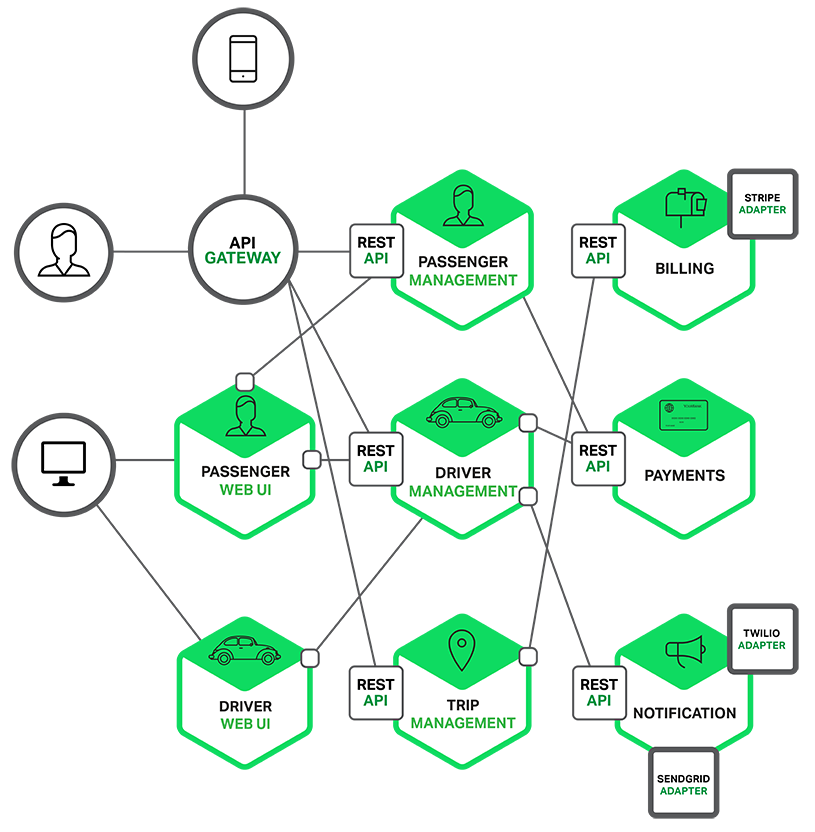
Each functional area of the application is now implemented by its own microservice. Moreover, the web application is split into a set of simpler web applications (such as one for passengers and one for drivers in our taxi-hailing example). This makes it easier to deploy distinct experiences for specific users, devices, or specialized use cases.
Each back-end service exposes a REST API and most services consume APIs provided by other services. For example, Driver Management uses the Notification server to tell an available driver about a potential trip. The UI services invoke the other services in order to render web pages. Services might also use asynchronous, message-based communication. Inter-service communication will be covered in more detail later in this series.
Some REST APIs are also exposed to the mobile apps used by the drivers and passengers. The apps don’t, however, have direct access to the back-end services. Instead, communication is mediated by an intermediary known as an API Gateway. The API Gateway is responsible for tasks such as load balancing, caching, access control, API metering, and monitoring, and can be implemented effectively using NGINX. Later articles in the series will cover the API Gateway.

The Microservice architecture pattern corresponds to the Y-axis scaling of the Scale Cube, which is a 3D model of scalability from the excellent book The Art of Scalability. The other two scaling axes are X-axis scaling, which consists of running multiple identical copies of the application behind a load balancer, and Z-axis scaling (or data partitioning), where an attribute of the request (for example, the primary key of a row or identity of a customer) is used to route the request to a particular server.
Applications typically use the three types of scaling together. Y-axis scaling decomposes the application into microservices as shown above in the first figure in this section. At runtime, X-axis scaling runs multiple instances of each service behind a load balancer for throughput and availability. Some applications might also use Z-axis scaling to partition the services. The following diagram shows how the Trip Management service might be deployed with Docker running on AWS EC2.
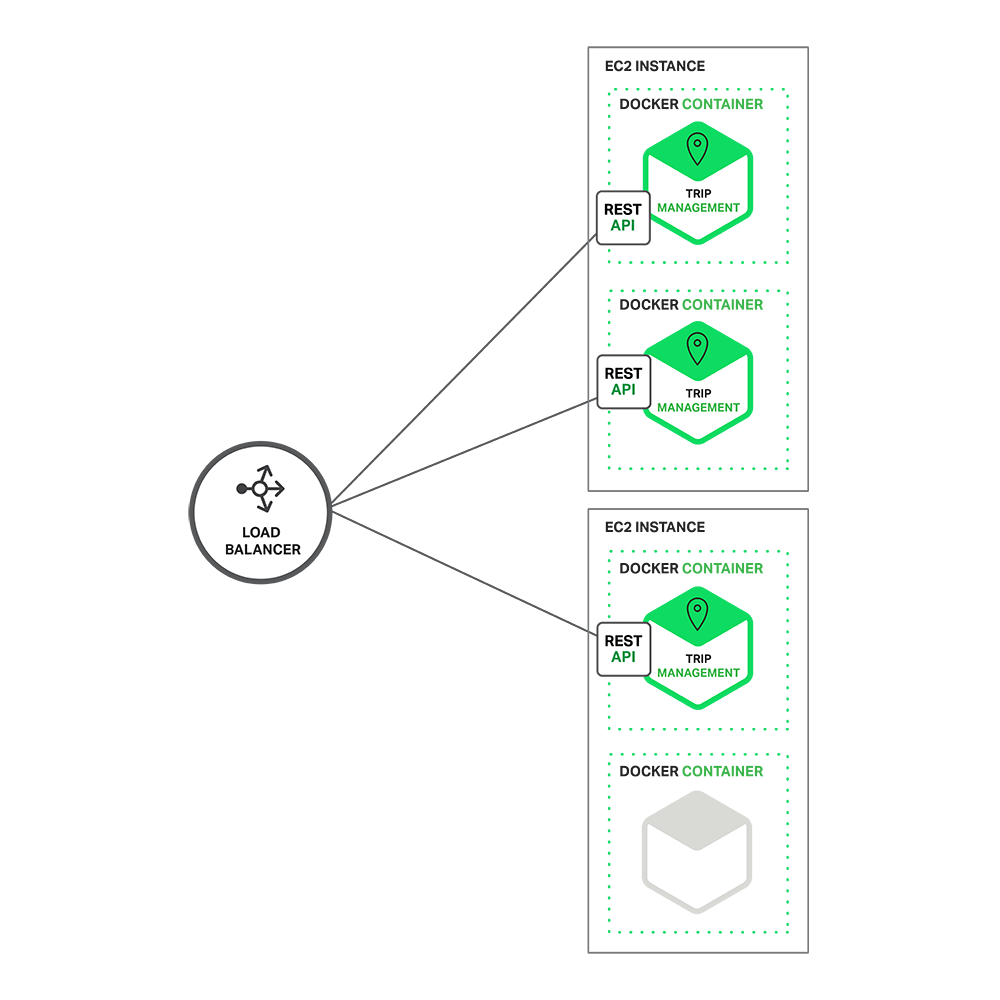
At runtime, the Trip Management service consists of multiple service instances. Each service instance is a Docker container. In order to be highly available, the containers are running on multiple Cloud VMs. In front of the service instances is a load balancer such as NGINX that distributes requests across the instances. The load balancer might also handle other concerns such as caching, access control, API metering, and monitoring.
The Microservice architecture pattern significantly impacts the relationship between the application and the database. Rather than sharing a single database schema with other services, each service has its own database schema. On the one hand, this approach is at odds with the idea of an enterprise-wide data model. Also, it often results in duplication of some data. However, having a database schema per service is essential if you want to benefit from microservices, because it ensures loose coupling. The following diagram shows the database architecture for the example application.
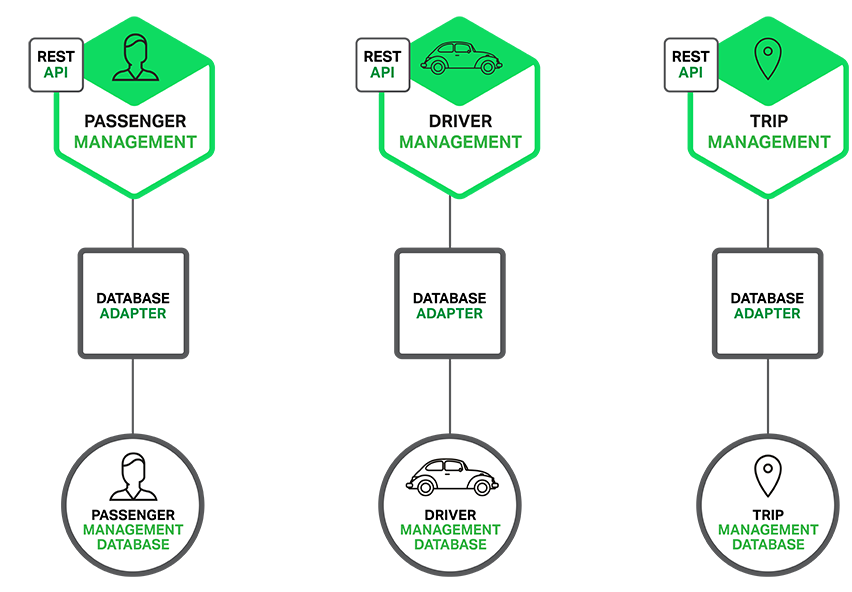
Each of the services has its own database. Moreover, a service can use a type of database that is best suited to its needs, the so-called polyglot persistence architecture. For example, Driver Management, which finds drivers close to a potential passenger, must use a database that supports efficient geo-queries.
On the surface, the Microservice architecture pattern is similar to SOA. With both approaches, the architecture consists of a set of services. However, one way to think about the Microservice architecture pattern is that it’s SOA without the commercialization and perceived baggage of web service specifications (WS-) and an Enterprise Service Bus (ESB). Microservice-based applications favor simpler, lightweight protocols such as REST, rather than WS-. They also very much avoid using ESBs and instead implement ESB-like functionality in the microservices themselves. The Microservice architecture pattern also rejects other parts of SOA, such as the concept of a canonical schema.
The Microservice architecture pattern has a number of important benefits. First, it tackles the problem of complexity. It decomposes what would otherwise be a monstrous monolithic application into a set of services. While the total amount of functionality is unchanged, the application has been broken up into manageable chunks or services. Each service has a well-defined boundary in the form of an RPC- or message-driven API. The Microservice architecture pattern enforces a level of modularity that in practice is extremely difficult to achieve with a monolithic code base. Consequently, individual services are much faster to develop, and much easier to understand and maintain.
Second, this architecture enables each service to be developed independently by a team that is focused on that service. The developers are free to choose whatever technologies make sense, provided that the service honors the API contract. Of course, most organizations would want to avoid complete anarchy and limit technology options. However, this freedom means that developers are no longer obligated to use the possibly obsolete technologies that existed at the start of a new project. When writing a new service, they have the option of using current technology. Moreover, since services are relatively small it becomes feasible to rewrite an old service using current technology.
Third, the Microservice architecture pattern enables each microservice to be deployed independently. Developers never need to coordinate the deployment of changes that are local to their service. These kinds of changes can be deployed as soon as they have been tested. The UI team can, for example, perform A|B testing and rapidly iterate on UI changes. The Microservice architecture pattern makes continuous deployment possible.
Finally, the Microservice architecture pattern enables each service to be scaled independently. You can deploy just the number of instances of each service that satisfy its capacity and availability constraints. Moreover, you can use the hardware that best matches a service’s resource requirements. For example, you can deploy a CPU-intensive image processing service on EC2 Compute Optimized instances and deploy an in-memory database service on EC2 Memory-optimized instances.
As Fred Brooks wrote almost 30 years ago, there are no silver bullets. Like every other technology, the Microservice architecture has drawbacks. One drawback is the name itself. The term microservice places excessive emphasis on service size. In fact, there are some developers who advocate for building extremely fine-grained 10-100 LOC services. While small services are preferable, it’s important to remember that they are a means to an end and not the primary goal. The goal of microservices is to sufficiently decompose the application in order to facilitate agile application development and deployment.
Another major drawback of microservices is the complexity that arises from the fact that a microservices application is a distributed system. Developers need to choose and implement an inter-process communication mechanism based on either messaging or RPC. Moreover, they must also write code to handle partial failure since the destination of a request might be slow or unavailable. While none of this is rocket science, it’s much more complex than in a monolithic application where modules invoke one another via language-level method/procedure calls.
Another challenge with microservices is the partitioned database architecture. Business transactions that update multiple business entities are fairly common. These kinds of transactions are trivial to implement in a monolithic application because there is a single database. In a microservices-based application, however, you need to update multiple databases owned by different services. Using distributed transactions is usually not an option, and not only because of the CAP theorem. They simply are not supported by many of today’s highly scalable NoSQL databases and messaging brokers. You end up having to use an eventual consistency based approach, which is more challenging for developers.
Testing a microservices application is also much more complex. For example, with a modern framework such as Spring Boot it is trivial to write a test class that starts up a monolithic web application and tests its REST API. In contrast, a similar test class for a service would need to launch that service and any services that it depends upon (or at least configure stubs for those services). Once again, this is not rocket science but it’s important to not underestimate the complexity of doing this.
Another major challenge with the Microservice architecture pattern is implementing changes that span multiple services. For example, let’s imagine that you are implementing a story that requires changes to services A, B, and C, where A depends upon B and B depends upon C. In a monolithic application you could simply change the corresponding modules, integrate the changes, and deploy them in one go. In contrast, in a Microservice architecture pattern you need to carefully plan and coordinate the rollout of changes to each of the services. For example, you would need to update service C, followed by service B, and then finally service A. Fortunately, most changes typically impact only one service and multi-service changes that require coordination are relatively rare.
Deploying a microservices-based application is also much more complex. A monolithic application is simply deployed on a set of identical servers behind a traditional load balancer. Each application instance is configured with the locations (host and ports) of infrastructure services such as the database and a message broker. In contrast, a microservice application typically consists of a large number of services. For example, Hailo has 160 different services and Netflix has over 600 according to Adrian Cockcroft. Each service will have multiple runtime instances. That’s many more moving parts that need to be configured, deployed, scaled, and monitored. In addition, you will also need to implement a service discovery mechanism (discussed in a later post) that enables a service to discover the locations (hosts and ports) of any other services it needs to communicate with. Traditional trouble ticket-based and manual approaches to operations cannot scale to this level of complexity. Consequently, successfully deploying a microservices application requires greater control of deployment methods by developers, and a high level of automation.
One approach to automation is to use an off-the-shelf PaaS such as Cloud Foundry. A PaaS provides developers with an easy way to deploy and manage their microservices. It insulates them from concerns such as procuring and configuring IT resources. At the same time, the systems and network professionals who configure the PaaS can ensure compliance with best practices and with company policies. Another way to automate the deployment of microservices is to develop what is essentially your own PaaS. One typical starting point is to use a clustering solution, such as Mesos or Kubernetes in conjunction with a technology such as Docker. Later in this series we will look at how software-based application delivery approaches such as NGINX, which easily handles caching, access control, API metering, and monitoring at the microservice level, can help solve this problem.
Building complex applications is inherently difficult. A Monolithic architecture only makes sense for simple, lightweight applications. You will end up in a world of pain if you use it for complex applications. The Microservice architecture pattern is the better choice for complex, evolving applications despite the drawbacks and implementation challenges.
In later blog posts, I’ll dive into the details of various aspects of the Microservice architecture pattern and discuss topics such as service discovery, service deployment options, and strategies for refactoring a monolithic application into services.
Stay tuned…
Building a New Application?
Break complex applications into independent and highly-reliable components to increase performance and time to market. Learn about microservices in the new ebook by O'Reilly.
I often get asked to recommend beginner resources for people new to PHP. And, it’s true, we don’t have many truly newbie friendly ones. I’d like to change that by first talking about the basics of environment configuration. In this post, you’ll learn about the very first thing you should do before starting to work with PHP (or any other language, for that matter).
We’ll be re-introducing Vagrant powered development.
Please take the time to read through the entire article – I realize it’s a wall of text, but it’s an important wall of text. By following the advice within, you’ll be doing not only yourself one hell of a favor, but you’ll be benefitting countless other developers in the future as well. The post will be mainly theory, but in the end we’ll link to a quick 5-minute tutorial designed to get you up and running with Vagrant in almost no time. It’s recommended you absorb the theory behind it before you do that, though.
Just in case you’d like to rush ahead and get something tangible up and running before getting into theory, here’s the link to that tutorial.
Let’s start with the obvious question – what is Vagrant? To explain this, we need to explain the following 3 terms first:
In definitions as simple as I can conjure them, a Virtual Machine (VM) is an isolated part of your main computer which thinks it’s a computer on its own. For example, if you have a CPU with 4 cores, 12 GB of RAM and 500 GB of hard drive space, you could turn 1 core, 4 GB or RAM and 20GB or hard drive space into a VM. That VM then thinks it’s a computer with that many resources, and is completely unaware of its “parent” system – it thinks it’s a computer in its own right. That allows you to have a “computer within a computer” (yes, even a new “monitor”, which is essentially a window inside a window – see image below):

A Windows VM inside a Mac OS X system
This has several advantages:
You might wonder – if I dedicate that much of my host computer to the VM (an entire CPU core, 4GB or RAM, etc), won’t that:
The answer to both is “yes” – but here’s why this isn’t a big deal. You only run the VM when you need it – when you don’t, you “power it down”, which is just like shutting down a physical computer. The resources (your CPU core, etc.) are then instantly freed up. The VM being slow is not a problem because it’s not meant to be a main machine – you have the host for that, your main computer. So the VM is there only for a specific purpose, and for that purpose, those resources are far more than enough. If you really need a VM more powerful than the host OS, then just give the VM more resources – like if you want to play a powerful game on your Windows machine and you’re on a Mac computer with 4 CPU cores, give the VM 3 cores and 70-80% of your RAM – the VM instantly becomes powerful enough to run your game!
But, how do you “make” a virtual machine? This is where software like VirtualBox comes in.
VirtualBox is a program which lets you quickly and easily create virtual machines. An alternative to VirtualBox is VMware. You can (and should immediately) install VirtualBox here.

VirtualBox provides an easy to use graphical interface for configuring new virtual machines. It’ll let you select the number of CPU cores, disk space, and more. To use it, you need an existing image (an installation CD, for example) of the operating system you want running on the VM you’re building. For example, if you want a Windows VM as in the image above, you’ll need a Windows installation DVD handy. Same for the different flavors of Linux, OS X, and so on.
When a new VM is created, it’s bare-bones. It contains nothing but the installed operating system – no additional applications, no drivers, nothing. You still need to configure it as if it were a brand new computer you just bought. This takes a lot of time, and people came up with different ways around it. One such way is provisioning, or the act of using a pre-written script to install everything for you.
With a provisioning process, you only need to create a new VM and launch the provisioner (a provisioner is a special program that takes special instructions) and everything will be taken care of automatically for you. Some popular provisioners are: Ansible, Chef, Puppet, etc – each has a special syntax in the configuration “recipe” that you need to learn. But have no fear – this, too, can be skipped. Keep reading.
This is where we get to Vagrant. Vagrant is another program that combines the powers of a provisioner and VirtualBox to configure a VM for you.
You can (and should immediately) install Vagrant here.
Vagrant, however, takes a different approach to VMs. Where traditional VMs have a graphical user interface (GUI) with windows, folders and whatnot, thus taking a long time to boot up and become usable once configured, Vagrant-powered VMs don’t. Vagrant strips out the stuff you don’t need because it’s development oriented, meaning it helps with the creation of development friendly VMs.
Vagrant machines will have no graphical elements, no windows, no taskbars, nothing to use a mouse on. They are used exclusively through the terminal (or command line on Windows – but for the sake of simplicity, I’ll refer to it as the terminal from now on). This has several advantages over standard VMs:

vagrant destroy which will destroy the VM and everything that was installed on it after the provisioning process (which happens right after booting up), and vagrant up which rebuilds it from scratch and re-runs the provisioning process afterwards, effectively turning back time to before you messed things up.With Vagrant, you have a highly forgiving environment that can restore everything to its original state in minutes, saving you hours upon hours of debugging and reinstallation procedures.
So, why do this for PHP development in particular?
These are the main but not the only reasons.
But why not XAMPP? XAMPP is a pre-built package of PHP, Apache, MySQL (and Perl, for the three people in the world who need it) that makes a working PHP environment just one click away. Surely this is better than Vagrant, no? I mean, a single click versus learning about terminal, Git cloning, virtual machines, hosts, etc…? Well actually, it’s much worse, for the following reasons:
There are many more reasons not to use XAMPP (and similar packages like MAMP, WAMP, etc), but these are the main ones.
So how does one power up a Vagrant box?
The first way, which involves a bit of experimentation and downloading of copious amounts of data is going to Atlascorp’s Vagrant Box list here, finding one you like, and executing the command you can find in the box’s details. For example, to power up a 64bit Ubuntu 14.04 VM, you run: vagrant init ubuntu/trusty64 in a folder of your choice after you installed Vagrant, as per instructions. This will download the box into your local Vagrant copy, keeping it for future use (you only have to download once) so future VMs based off of this one are set up faster.
Note that the Atlascorp (which, by the way, is the company behind Vagrant) boxes don’t have to be bare-bones VMs. Some come with software pre-installed, making everything that much faster. For example, the laravel/homestead box comes with the newest PHP, MySQL, Nginx, PostgreSQL, etc pre-installed, so you can get to work almost immediately (more on that in the next section).
Another way is grabbing someone’s pre-configured Vagrant box from Github. The boxes from the list in the link above are decent enough but don’t have everything you might want installed or configured. For example, the homestead box does come with PHP and Nginx, but if you boot it up you won’t have a server configured, and you won’t be able to visit your site in a browser. To get this, you need a provisioner, and that’s where Vagrantfiles come into play. When you fetch someone’s Vagrantfile off of Github, you get the configuration, too – everything gets set up for you. That brings us into HI.
HI (short for Homestead Improved) is a version of laravel/homestead. We use this box at SitePoint extensively to bootstrap new projects and tutorials quickly, so that all readers have the same development environment to work with. Why a version and not the original homestead you may wonder? Because the original requires you to have PHP installed on your host machine (the one on which you’ll boot up your VM) and I’m a big supporter of cross-platform development in that you don’t need to change anything on your host OS when switching machines. By using Homestead Improved, you get an environment ready for absolutely any operating system with almost zero effort.
The gif above where I boot up a VM in 25 seconds – that’s a HI VM, one I use for a specific project.
I recommend you go through this quick tip to get it up and running quickly. The first run might take a little longer, due to the box having to download, but subsequent runs should be as fast as the one in my gif above.
Please do this now – if at any point you get stuck, please let me know and I’ll come running to help you out; I really want everyone to transition to Vagrant-driven-development as soon as possible.
By using HI (and Vagrant in general), you’re paving the way for your own cross-platform development experience and keeping your host OS clean and isolated from all your development efforts.
Below you’ll find a list of other useful resources to supercharge your new Vagrant powers:
Do you have any questions? Is anything unclear? Would you like me to go into more depth with any of the topics mentioned above? Please let me know in the comments below, and I’ll do my best to clear things up.

خیلی کم پیش میآید… گهگاهی شهابی ظاهر میشود و درخشش آن و دنباله اسرارآمیزش شگفتی به بار میآورد. ولی تا به خود بیاییم و بخواهیم جزییاتش را خودآگاهانه و دقیقتر مشاهده کنیم، از نظرها ناپدید میشود و فقط خاطرهای محو از آن در ذهنمان باقی میماند؛ همراه با احساسی بیان ناشدنی که در نزدیکترین تقریب شاید چیزی بین دلهرهای خفیف و شوقی لرزان باشد… [دنیا جای عجیبیست!]
Oliver Caldwell has been working on a module that lets you use lazy arrays (GitHub: Wolfy87/lazy-array, License: The Unlicense, npm: lazy-array) in JavaScript. If you've ever used Clojure for any amount of time you'll find you start actually thinking in lazy sequences, and start wanting to use them on other platforms.
Clojure's lazy sequences are sequences of values that you can query, slice, and compose. They're generated algorithmically but don't haven't to exist entirely in memory. A good example of this is the Fibonacci sequence. With Oliver's module you can define and manipulate the Fibonacci sequence like this:
var larr = require('lazy-array');

function fib(a, b) {
  return larr.create(function() {
    return larr.cons(a, fib(b, a + b));
  });
}

var f = fib(1, 1);
larr.nth(f, 49); // 12586269025
In this example, the larr.create method defines a sequence using larr.cons, which is a "core sequence" function. The methods provided by Lazy Array are based on Clojure's lazy sequence methods, so you get the following:
first: Get the first itemrest: Get the tail of the arraycons: Constructs a new array by prepending the item on the listtake: Returns a lazy array which is limited to the given lengthdrop: Returns a lazy array which drops the first n resultsnth: Fetches the nth resultThere are more methods -- if you want to see the rest look at the JSDoc comments in lazy-array.js.
Lazy sequences are not magic: you can easily make Clojure blow up:
(defn fib [a b] (lazy-seq (cons a (fib b (+ a b)))))

(take 5 (fib 1 1))
; (1 1 2 3 5)

(take 2000 (fib 1 1))

; ArithmeticException integer overflow  clojure.lang.Numbers.throwIntOverflow (Numbers.java:1424)
But the point isn't that they're a way of handling huge piles of data, it's more a programming primitive that makes generative algorithms easier to reason about. What I really like about Oliver's work is he links it to UI development:
We JavaScript frontend wranglers deal with events, networking and state all day long, so building this had me wondering if I could apply laziness to the UI domain. The more I thought about this concept and talked with colleagues about it I realised that I’m essentially heading towards functional reactive programming, with bacon.js as a JavaScript example.
The UI example Oliver uses is based on an infinite lazy array of all possible times using a given start date and step timestamp. This might be a concise way of representing a reactive calendar widget.
If you're interested in lazy sequences and want to read more about Clojure, I found Lazy Sequences in Clojure useful when fact checking this article.

MAD MAX v. Adventure Time is just fantastic
7 Rules for Creating Gorgeous UI and the second part. Written by and for non-designers, focuses on the basic skills you need get a functional design.
The first secret of design is ... noticing (video) Tony Fadell on noticing the big picture and the little details.
Much of the product design work from job applicants I’ve seen recently has been superficial, created with one eye towards Dribbble. Things that look great but don’t work well. … In contrast, the best job applicants I’ve seen sent in their thought process. Sketches. Diagrams. Pros and cons. Real problems. Tradeoffs and solutions.
The Best Email App To Get To Inbox Zero Fastest: A Time Trial Review (In 1 Graph) It comes down to UI with good defaults, and responsiveness even with bad reception:
It may seem trivial, but seconds add up to minutes very quickly. And, for those of us who answer a lot of email, that can mean an extra 10–30 minutes a day of wasted time.
Keynote Motion Graphic Experiment Oh the many things you can do with Keynote: "It's pretty impressive how much Keynote can stand up to pro animation apps like After Effects and Motion and how fast it makes process."
In product design, focus is freeing.
Decisions are faster, easier, and more confident when you know what you're making, for who & why.
JSON API 1.0 After two years the JSON API spec goes 1.0. Looks like it focuses on standardizing message wrapping for RPC usage, to the benefit of tools/libraries. CORBA and WS-* chased the same goal, maybe third time's the charm?
GitUp Mac app that simplifies some of the more complex Git tasks. Watch the video, it might just be the app for you.
Percy Visual regression tests on every build. Your test suite uploads HTML and assets, Percy does the rendering and visual diff, updates CI with the build status. Going to give this a try.
vim-json Pathogen plugin with distinct highlighting of keywords vs values, JSON-specific (non-JS) warnings, quote concealing.
Introduction to Microservices Nginx wants to be a critical part of your microservices infrastructure.
slack-bot-api A Node.js library for using the Slack API.
WatchBench Build Apple Watch apps in JavaScript.
Seriously, browse the web with the developer tools console open logging errors and be truly amazed that the internet ever worked.
woofmark A modular, progressive, and beautiful Markdown / HTML editor.
csscv Formats HTML to look like a CSS file, cool way to publish your résumé.
Typeeto This app lets you share your Mac keyboard with other devices, without the hassle of BT connect/disconnect.
I deal with assets on a cache by cache basis.
Web App Speed From original iPad to iPad Air, Safari got 10x faster. It's not the browser that's slow anymore, it's us choosing to overload it with frameworks and libraries and ads:
It’s frustrating to see people complain about bad web performance. They’re often right in practice, of course, but what’s annoying is that it is a completely unforced error. There’s no reason why web apps have to be slow.
JavaScript Code Smells Slides and video from the FluentConf talk that will teach you how to lint like a boss.
ESLint has two levels, folks. Use "warning" for anything that shouldn't be checked in, and "error" for anything that shouldn't be written.
AppSec is Eating Security (video) This is a must watch for anyone that's in security and/or software development. The line has moved, security is no longer about firewalls and networking and IT — security is now the application's domain and it's everybody's job.
MonolithFirst Build it up then build it out, that's exactly how we're building apps at Broadly:
A more common approach is to start with a monolith and gradually peel off microservices at the edges. Such an approach can leave a substantial monolith at the heart of the microservices architecture, but with most new development occurring in the microservices while the monolith is relatively quiescent.
Toyota Unintended Acceleration and the Big Bowl of “Spaghetti” Code This code determines if you'll die in a car crash:
Skid marks notwithstanding, two of the plaintiffs’ software experts, Phillip Koopman, and Michael Barr, provided fascinating insights into the myriad problems with Toyota’s software development process and its source code – possible bit flips, task deaths that would disable the failsafes, memory corruption, single-point failures, inadequate protections against stack overflow and buffer overflow, single-fault containment regions, thousands of global variables.
Why are programmers obsessed with cats?
9) If you work all night to solve a particular coding requirement and you succeed, your cat will come running into the kitchen and celebrate with you at 4:00am with a bowl of cream.

Proposed Statement on "HTTPS everywhere for the IETF" I would listen to Roy on this one:
TLS does not provide privacy. What it does is disable anonymous access to ensure authority. It changes access patterns away from decentralized caching to more centralized authority control. That is the opposite of privacy. TLS is desirable for access to account-based services wherein anonymity is not a concern (and usually not even allowed). … It's a shame that the IETF has been abused in this way to promote a campaign that will effectively end anonymous access, under the guise of promoting privacy.
U.S. Suspects Hackers in China Breached About 4 Million People’s Records, Officials Say I have an idea: let's give the feds backdoor access to all our private data. What could possibly go wrong?
Security experts tell us that China is responsible for a 1000% increase in use of the non-word “cyber” in tonight’s news broadcasts.
The Agency "From a nondescript office building in St. Petersburg, Russia, an army of well-paid “trolls” has tried to wreak havoc all around the Internet — and in real-life American communities." Facebook and Instagram are the new battlegrounds.
Apple Macs vulnerable to EFI zero-day
Evil Wi-Fi captive portal could spoof Apple Pay to get users’ credit card data TL;DR The portal page that signs you up to a WiFi network can be made to look like the "add a credit card" page.
Web security is totally, totally broken. Your web browser trusts TLS certificates by verifying the CA, making the CA the single point of failure. What if instead we use the blockchain to verify certificates?
OpenSesame Cool hack to open any fixed-code garage door. 1. Automate dip switch flipping for a 29 minute run. 2. Use shift register to bring that down to 8 seconds. 3. Build it from a Mattel toy.
Intentional hiring: how not to suck at hiring data scientists (or anyone else) TL;DR know what you want from the process, and don't be afraid to talk to people:
We don’t have to rely on confidence as a proxy for ability, because we’ve put so much work into learning how to ask questions that (we think) reveal their actual ability. It also means more diversity in our team.
@ldavidmarquet Much truth in that:
Bosses make people feel stressed.
Leaders make people feel safe.
OH: "We used to leak kilobytes, then megs, then even gigs. Now, we leak EC2 instances. Someday, we'll leak entire datacenters."
sudo first and ask questions later
SnoozeInBrief Applies to so many creative professions:
How to tell whether you're a writer:
1) Write something.
2) If it took far too long and you now hate yourself, you're a writer.
The Software Paradox "RedMonk’s Stephen O’Grady explains why the real money no longer lies in software, and what it means for companies that depend on that revenue."
Google maps should have a feature where if you know a better route, you can say “OK, Google, watch this,” and then drive it. They could improve their directions that way.
Here Comes the Airplane The hot new startup everyone's talking about:


توانا بود هر که دانا بود. این جمله شاید بهترین بیان وضعیت امروز ما در ارتباط با غولهای اینترنتیای همانند گوگل، فیسبوک و صنعت دادههای بزرگ باشد. هر که در مورد ما بیشتر میداند، تسلط بیشتری بر ما دارد. رابطهای که ما به عنوان کاربر با شرکتهایی همانند گوگل و فیسبوک برقرار کردهایم به معاملهای فاوستی میماند. معاملهای که ما در آن خصوصیترین اطلاعات خود را در برابر تعدادی سرویس رایگان اینترنتی در اختیار این شرکتها قرار دادهایم. اطلاعات خصوصیای که اکثریتمان هیچ ایدهای نداریم که چه استفادهای از آنها میشود و در اختیار چه کسانی قرار میگیرند. آیا چنین معاملهای عادلانه است؟ آیا کابران از ابعاد دادههایی که جمعآوری و پردازش میشوند باخبرند؟ آیا این تهدیدی برای دولتهاست یا فرصتی برای حکمرانی همهجانبه؟ از طرفی دیگر اگر دادههای بزرگ و سرویسهای اینترنتی مرتبط با آن لازم و به درد بخورند آیا آلترناتیوی جز آنچه غولهای اینترنتی در برابرمان قرار میدهند قابل تصور نیست؟ به دنبال پاسخی برای این سوالها با جادی، فعال و نویسنده در حوزه تکنولوژی و اینترنت گفتگو کردیم.